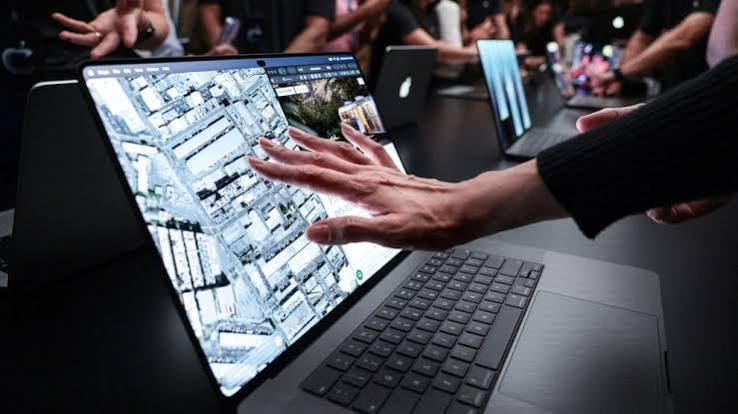
Apple has officially opened a new chapter in personal computing with the announcement of its first touchscreen MacBook Pro, introducing touch based interaction to a product line that has relied on traditional keyboards and trackpads for decades. Announced on October 28, 2026, the new MacBook Pro with PROLED XDR Display represents a significant change in Apple’s hardware strategy. The announcement marks a historic moment for Mac users, creative professionals, developers, and anyone who has wondered why Apple’s popular laptop lineup never offered the direct screen interaction available on iPhones and iPads. With a tandem OLED display, powerful M5 Pro and M5 Max processors, and a redesigned touch experience, Apple is bringing two familiar computing experiences closer together.
Apple Finally Brings Touchscreen Technology to MacBook Pro
For years, Apple maintained a clear distinction between its MacBook and iPad product families. MacBooks were designed around keyboards, trackpads, and conventional desktop computing, while iPads offered direct interaction through touchscreens. Although competing laptop manufacturers introduced touchscreen technology across several product categories, Apple continued to focus on its established Mac interaction model.
That approach has now changed. The new MacBook Pro introduces touch functionality directly into the Mac experience, allowing users to interact with content using their fingers instead of relying exclusively on a trackpad or mouse. This is more than a small hardware addition because it introduces a different way of working with macOS while retaining the familiar laptop format.
Apple’s announcement is particularly significant because it demonstrates that the company is willing to reconsider long standing design decisions when new technology creates meaningful opportunities. Rather than turning the MacBook into a conventional tablet, Apple is combining touch input with the traditional desktop experience that professional users already understand.
What Makes the New Touchscreen MacBook Different?
The new MacBook Pro is available in 14 inch and 16 inch configurations. Its most distinctive feature is the PROLED XDR display, which uses advanced tandem OLED technology to deliver improved contrast, brightness, and color accuracy.
According to Apple’s announcement, the display supports peak brightness of up to 2,000 nits, a contrast ratio of 10,000,000 to 1, and a variable refresh rate of up to 120Hz. These specifications are particularly relevant for professionals who regularly work with photographs, video footage, animation, and other visually demanding projects.
One important engineering decision involves the touch sensor itself. Apple has integrated the sensor directly into the display panel rather than simply placing another touch layer above the screen. This approach is intended to reduce input latency and make interactions feel more immediate.
Natural Touch Gestures and Everyday Controls
The touchscreen experience supports several familiar gestures that smartphone and tablet users already understand. Users can scroll through webpages, pinch to zoom into photographs, move presentation slides, and interact with application windows using their fingers.
Window management also receives touch friendly controls. Users can double tap a window to expand it or use a flick gesture to arrange it on the screen. These additions could make everyday tasks feel more direct, particularly when someone wants to quickly adjust content without moving their hands toward a trackpad.
However, the traditional keyboard and trackpad remain important parts of the MacBook experience. Apple is not removing established controls. Instead, the company is providing another input method that users can choose whenever it makes sense for their workflow.
Powerful M5 Pro and M5 Max Chips Support Professional Workloads
A touchscreen display would have limited value if the computer could not handle demanding professional applications. Apple has therefore paired the new MacBook Pro with its M5 Pro and M5 Max processors, designed to support intensive computing tasks and professional creative workflows.
The company says the new configurations support up to 128GB of unified memory and storage capacities reaching 16TB. This combination gives professionals substantial resources for working with large projects, complex applications, and demanding creative software.
For video editors, the additional processing capability can be useful when managing high resolution footage and complex timelines. Developers may benefit when running multiple applications, testing software, and managing large development environments. Photographers and designers can also take advantage of the improved display and processing hardware when working with detailed visual content.
Apple has also announced battery life of up to 24 hours, depending on configuration and usage. This is particularly relevant for professionals who travel frequently or work away from their usual desks.
Creative Professionals Could Benefit Most From Touch Interaction
One of the strongest reasons for introducing touchscreen functionality to a professional laptop is the opportunity to change how people interact with creative software. For someone editing photographs, designing graphics, or working with three dimensional models, direct screen interaction can feel more natural than constantly switching between a mouse, trackpad, and keyboard.
Graphic Design and Digital Illustration
Graphic designers can use the display as a larger interactive workspace. Instead of depending entirely on trackpad movements, they can directly interact with visual elements and manipulate content on the screen. This could be particularly useful when adjusting compositions, selecting objects, or working with creative applications that support touch controls.
Video Editing and Photography
Video editors and photographers regularly make detailed adjustments to images and timelines. Touch gestures could provide a more direct way to zoom into photographs, move visual elements, and interact with editing tools. Apple has identified applications such as Adobe Lightroom and DaVinci Resolve among the software products that will support the new touch capabilities.
Music Production and Three Dimensional Design
Musicians will also have new opportunities to interact with software instruments directly on the display. Meanwhile, professionals working with three dimensional models can manipulate objects through touch rather than relying exclusively on conventional input devices.
These applications demonstrate why the announcement matters beyond everyday browsing. For certain professional tasks, touching the content directly can offer a practical advantage.
macOS 27 Introduces a More Touch Friendly Mac Experience
Hardware is only one part of the touchscreen experience. The operating system must also respond naturally to touch without making traditional desktop controls difficult to use.
The new MacBook Pro runs macOS 27, known as Golden Gate. Apple has introduced touch focused system interactions while maintaining the familiar Mac interface. Existing trackpad gestures can also be performed directly on the display, helping users move between established and new interaction methods.
Apple applications are optimized for the new hardware, while many existing applications can respond to touch through the operating system’s automatic translation of touch input into clicks. Developers can also use updated system gesture tools to create more specific touchscreen experiences.
Several third party applications are expected to benefit, including Notion, Canva, Microsoft Word, Excel, PowerPoint, Zoom, Adobe Lightroom, Blender, and DaVinci Resolve.
The inclusion of Dynamic Island on the Mac is another notable development. The feature provides an interactive location for Spotlight, Live Activities, and Siri AI, bringing another familiar element from Apple’s mobile products to its desktop platform.
Pricing and Availability of the First Touchscreen MacBook
Apple is positioning the touchscreen MacBook Pro as a premium professional computer. Its starting price is significantly higher than that of the standard MacBook Pro models introduced alongside the new touchscreen version.
The 14 inch touchscreen MacBook Pro starts at $2,899 in the United States. Customers can choose between M5 Pro and M5 Max configurations, with the final price depending on the selected processor, memory, storage, and other options.
Apple opened preorders on October 28, 2026, with general availability scheduled to begin on November 6, 2026. As of November 1, the new touchscreen models have been announced and are available for preorder, but their general retail release is still several days away.
Customers considering an upgrade should carefully compare their existing computer with the new model. The touchscreen functionality and advanced display may be valuable for creative professionals, but users who primarily browse the internet, write documents, or perform basic office tasks may not need to pay the additional premium.
How Apple’s Decision Could Affect the Laptop Industry
Apple’s entry into touchscreen laptops could influence how other computer manufacturers approach future product designs. Touchscreen technology is already available across much of the Windows laptop market, but Apple’s decision carries particular significance because of the company’s influence on hardware design and user experience.
For years, laptop manufacturers have explored different ways to combine traditional computing with mobile interaction. Convertible laptops, detachable keyboards, digital pens, and tablet inspired interfaces have all attempted to make computers more flexible.
Apple’s approach is different because it introduces touch directly into its established professional laptop family rather than requiring customers to purchase a separate hybrid device. This could encourage software developers to give greater attention to touch friendly interfaces, particularly in applications used by designers, engineers, musicians, and content creators.
Nevertheless, the success of this approach will depend on how naturally the technology works during everyday use. A touchscreen is useful only when applications are properly optimized and users can interact with the interface comfortably for extended periods.
Should MacBook Users Consider Buying the New Touchscreen Model?
The new MacBook Pro is not necessarily the right purchase for every Mac user. Its premium price makes it especially important to consider individual requirements before upgrading.
Creative professionals who frequently work with visual content may find the combination of a high quality OLED display, powerful processors, and direct touch controls particularly appealing. Developers interested in testing touch based applications may also appreciate the additional functionality.
On the other hand, students, office workers, and general users who primarily depend on conventional keyboard and trackpad controls may find a standard MacBook Pro more suitable for their budgets.
Before making a purchase, potential buyers should consider their software requirements, preferred working style, memory needs, storage capacity, and expected battery usage. Waiting for independent reviews and real world performance testing may also help customers make a more informed decision.
A Historic Moment for Apple’s MacBook Family
Apple’s first touchscreen MacBook Pro represents a meaningful departure from the company’s traditional laptop philosophy. By combining direct touch interaction with macOS, advanced tandem OLED technology, and powerful Apple silicon, the company is introducing a new option for people who want greater flexibility from a professional computer.
The announcement does not mean that keyboards, trackpads, or conventional desktop computing are becoming obsolete. Instead, it suggests that future computers may offer several complementary ways to interact with the same content, allowing users to choose the method that feels most comfortable for a particular task.
We believe the most important question is not whether touchscreen technology belongs on a MacBook, but how effectively Apple can integrate it into the workflows that professionals depend on every day. The answer will become clearer once customers begin using the new models after their November 6 release.
One thing is already clear: Apple’s decision has created a new chapter in Mac history. For the first time, MacBook users can experience direct touchscreen interaction without leaving the familiar laptop environment, marking a significant milestone in the relationship between traditional computers and mobile devices.
Official Information and Further Reading
Readers interested in the technical specifications, display technology, configurations, and availability can explore the Apple Newsroom for the company’s official product announcement. Additional information about the MacBook family, available configurations, and purchasing options can be found on Apple’s official Mac website.